
Part 4 of our Gaussian Splatting series. Part 1: What is Gaussian Splattin Part 2:From Scan to SketchUp Part 3:Lixel K2 Workflow.This one answers the questions we see searched most: which format goes where, and why.
1. Which file types have we tested so far?
We thoroughly enjoy working in Lixel CyberColor Studio, and with it, the translation to SketchUp. SketchUp itself now imports multiple Gaussian splat formats: PLY, LCC, LCC2, and SPZ files from a platform like Scaniverse.
Between Lixel CyberColor Studio and the SuperSplat website, we can jump from one file version to the next, and it becomes really powerful when we manipulate the Gaussian splat inside editing software before it ever reaches SketchUp.
Our general chain: we operate in the LCC format, export from LCC into SuperSplat, and from there import or export the objects we use in our SketchUp environment.
And it works in both directions. We can export the Gaussian splat to SketchUp and place SketchUp objects inside that environment to see how they function, or we can export SketchUp objects into the LCC software and see how they function there. A nice bonus on the LCC side: the Studio environment comes with a video export tool for creating fly-throughs and walk-throughs of the space.
For getting modelled objects into CyberColor Studio, the import menu accepts OBJ, FBX, and GLB. SketchUp natively exports to OBJ and GLB easily, and with the help of Blender we can import and export FBX where required.
2. Why has OBJ worked best for the SketchUp-to-Lixel workflow?
OBJ and GLB are the most native formats to these import/export scenarios, but they behave differently:
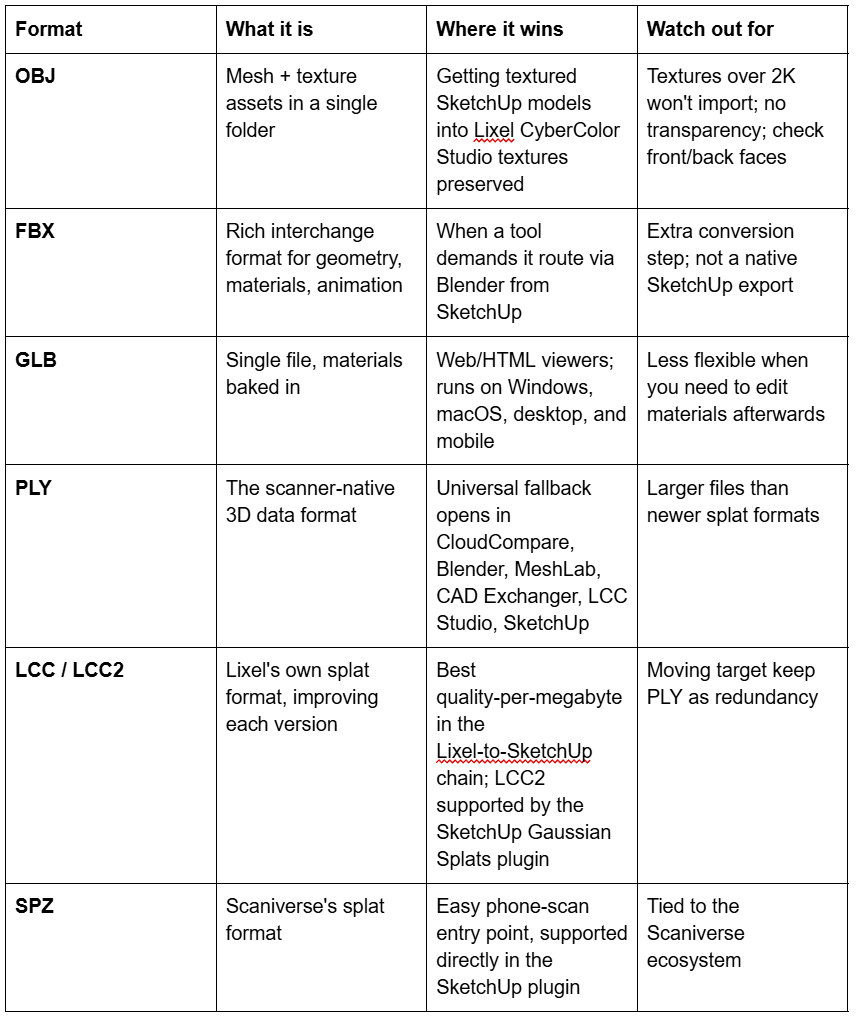
OBJ is a mesh asset plus a texture asset, combined in a single folder.
GLB is a single file with the material baked in rather than attached separately. It's the go-to for HTML web environments, and it runs natively on Windows and macOS, desktop and mobile.
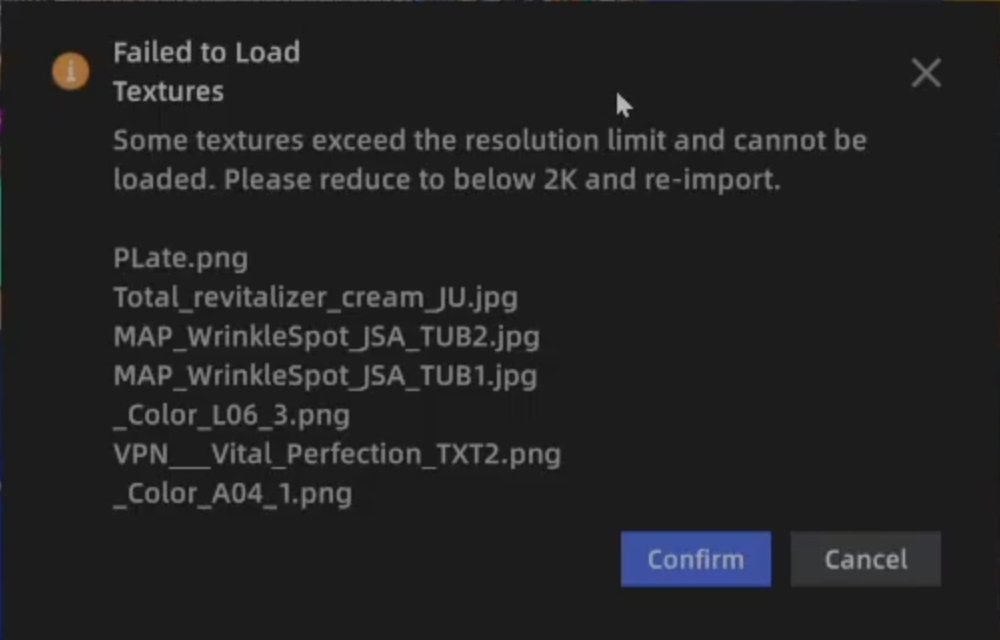
In our testing, Lixel CyberColor Studio imports the OBJ best — all textures are preserved. The one warning we've hit: any texture exceeding 2K resolution won't import. Downsize oversized textures in SketchUp or Photoshop before you export.
Our standing advice inside SketchUp: work with textures of 1,000 × 1,000 pixels maximum. No render short of something printed at A2 or larger will see a texture-quality difference beyond that.
3. Where does PLY fit into the Gaussian splat workflow?
PLY is the foundational file format across all the different tools.
It isn't exclusive to any one software and isn't fighting for territory, it was principally designed to store three-dimensional data from a 3D scanner, any scanner, in any software. Between CloudCompare, Blender, MeshLab, CAD Exchanger, LCC Studio, and SketchUp, the PLY file imports everywhere.
That neutrality matters because the LCC format keeps getting upgraded. LCC has since moved to LCC2, which the latest SketchUp Gaussian Splats plugin supports, and we're happy to see it used. But when a format is moving, it's sometimes easier to revert your export out of LCC to PLY, the format everything understands. PLY is the constant; LCC is the cutting edge.
4. What goes wrong with textures?
Three things, in practice:
The textures are simply too big. Anything over 2K won't import into the LCC environment. Downsize first.
Front faces and back faces clash. SketchUp natively gives every surface a front and a back face, and sometimes the two carry different materials. Keep your modelling clean and apply materials only to the outer face.
Transparency doesn't travel. OBJ materials don't import with any sense of transparency, you'll be looking at a closed-surface object on the other side. Plan for that in how you model glazing and openings.
5. Quick reference: Format Options
6. How should someone choose the right export format?
Our recommendation: use PLY as your redundancy file format.
Software keeps getting upgraded, and file formats keep standardising across importing and exporting tools. At the same time, the LCC format is refining itself, capturing more quality in a smaller data footprint, so we get smaller files of higher quality with each version.
So the practical guidance is:
Keep an eye on LCC as it moves from LCC1 to LCC2 that's where the quality-per-megabyte gains are.
Keep PLY as your industry-standard fallback the file you can still open in five years, in whatever tool has won by then.
Make sure whatever your scanner outputs transfers cleanly through something like SuperSplat or CloudCompare into SketchUp or make your requests known to the SketchUp team.
Scaniverse is a good example of the ecosystem maturing: it's such an easy entry point, and its SPZ format is supported directly in the SketchUp Gaussian Splats plugin.
Either way, we wish you well.
For questions, email info@studiojdb.com. Hardware specifications or pricing: Chris at BuildingPoint SA, ckeightley@buildingpointsa.com.
Part 3: Lixel K2 Workflow Next in series: Placing SketchUp Models Inside Real Scanned Environments